Free shipping in Italy — Worldwide delivery available
Complete Guide to
Authenticity Verification
Every giansanto_ garment is protected by an 8-layer anti-counterfeit system. This guide explains how to verify each one to have absolute certainty of your garment's authenticity.
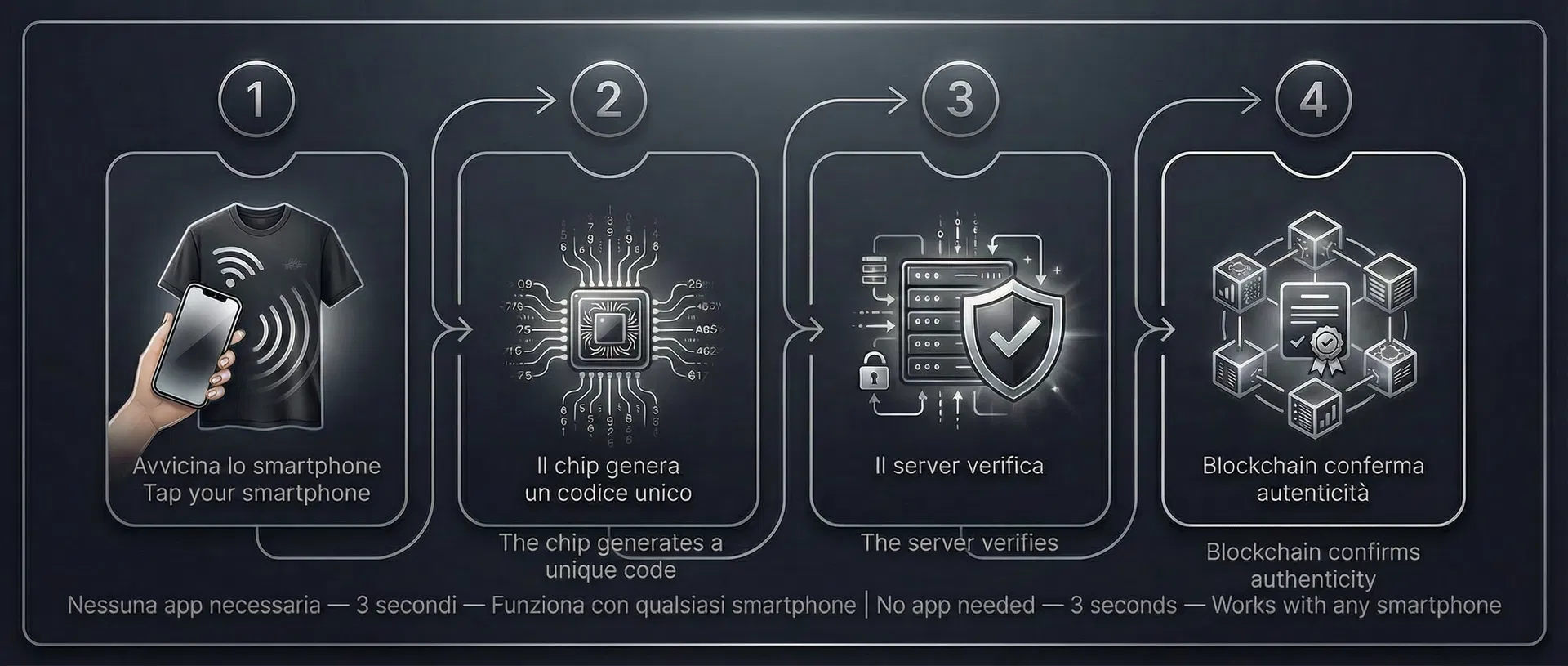
The 3 Fundamental Steps
Scan the NFC Tag
Hold your smartphone near the NFC tag sewn onto the chest area of the t-shirt. Your phone will automatically open the verification page. No app is required — it works with any modern smartphone with NFC enabled (iPhone XS or later, most Android phones).
Avvicina lo smartphone al tag NFC sul petto. Il telefono aprirà automaticamente la pagina di verifica. Nessuna app necessaria.
Check the Result
The verification page will display a green shield if the garment is authentic. You will see the piece number (e.g. N. 01/30), the read counter, and the cryptographic verification details. A red shield means verification failed.
La pagina di verifica mostrerà uno scudo verde se il capo è autentico. Vedrai il numero del pezzo, il contatore di letture e i dettagli crittografici.
Scan Again to Confirm
This is the most important step. Scan the NFC tag a second time: the read counter MUST increase. If the counter stays the same, the page may be a fake static copy. A genuine NFC chip always produces a new, higher counter value.
Questo è il passaggio più importante. Scansiona di nuovo: il contatore DEVE aumentare. Un chip NFC autentico produce sempre un nuovo valore più alto.
The 8 Layers of Protection
When you scan an authentic giansanto_ garment, the verification page shows 8 security elements. Here is what to check in each one.
LAYER 1
Real-Time Clock
The verification page shows the exact date and time of verification, including seconds and timezone. This timestamp is generated at the moment of scanning. If you see a date or time that doesn't match the current moment, the page may be a saved copy.
Check that: date, time, and timezone match exactly the moment you are scanning.
LAYER 2
Progressive Counter
Every time the NFC chip is scanned, an internal counter increases by 1. This counter can never decrease or be reset. On the verification page you will see the current value and, from the second scan onwards, the comparison with the previous value.
Green badge "COUNTER PROGRESSING": the counter increased from the previous scan. The chip is physically present.
Yellow warning "COUNTER DID NOT INCREASE": possible static page copy. Scan the physical tag again.
LAYER 3
Hardware Cryptographic Signature
At each scan, the cryptographic chip generates a unique signature using a military-grade algorithm. This signature depends on the chip's hardware identity, the progressive counter, and a secret key derived exclusively for that chip via a proprietary protocol. It is mathematically impossible to generate a valid signature without possessing the original key.
The green shield confirms the cryptographic signature was successfully verified by our server.
LAYER 4
Registered Owner
After purchase, you can register as the garment's owner. Your name (in partial form, e.g. "M. Rossi") will be visible to anyone who scans the tag. The full name is only visible to you when authenticated. When you sell the garment, you can generate a transfer code for the new owner.
Check the "REGISTERED OWNER" section: you will see the current owner's partial name and registration date.
The "OWNERSHIP CHAIN" shows the complete history of all owners with registration dates.
LAYER 5
Scan Geolocation
Each scan records the approximate city it comes from. This allows you to verify the garment was scanned from your current location. If a garment sold in Milan is scanned in Shanghai, it's a warning sign.
Check that the city shown in "Scanned from" matches your current location.
LAYER 6
Anomaly Detection
The system monitors the number of scans and the locations they come from. If a chip receives more than 50 verifications in 24 hours, or if scans come from more than 10 different locations in 24 hours, an anomalous activity warning is displayed. This could indicate someone is testing a copy of the tag.
No warning = normal activity. The number of scans in the last 24h is visible on the page.
Warning "ANOMALOUS ACTIVITY DETECTED" = too many scans or too many different locations. Proceed with caution.
LAYER 7
Dynamic QR Code (60 seconds)
After a successful verification, the page generates a unique QR code with a cryptographic token that expires after 60 seconds. This QR is proof that verification happened at that exact moment. It cannot be screenshotted and reused because it expires quickly.
The QR code shows a countdown timer. When it expires, it turns red and must be regenerated with a new scan.
LAYER 8
Product Digital Fingerprint
Each garment has a unique digital fingerprint composed of: color, size, fabric weight, composition, manufacturer, country of origin, and specific piece photo. Even if someone managed to detach the NFC tag and attach it to a fake, all this data would not match. The fake would be immediately exposed.
Compare the data shown (color, size, fabric weight, manufacturer) with the physical garment in your hands. They must match exactly.
Independent Blockchain Verification
Each giansanto_ garment is linked to a digital certificate (NFT) on blockchain. This means the garment's authenticity is recorded on a public and immutable ledger, independent from our website.
HOW TO VERIFY ON BLOCKCHAIN
Blockchain Explorer — Independent verification
Ownership Registration & Transfer
HOW TO REGISTER
No crypto wallet or dedicated app needed. Everything works from your smartphone's browser.
HOW TO TRANSFER OWNERSHIP
When you sell your garment, you can transfer ownership to the new buyer:
Every ownership transfer is recorded in the "Ownership Chain", creating a complete and transparent history.
Note: the transfer registers ownership in our system. If the new owner has a crypto wallet and wishes to also receive the NFT, they can contact [email protected].
How to Spot a Fake
A counterfeit garment may imitate the look of the verification page, but it cannot replicate the cryptographic system. Here are the warning signs:
SECURITY PROTOCOL
Product Data & Traceability
The verification page shows the physical data of the original garment. This data is recorded in our database at the time of production and cannot be modified. If the garment in your hands doesn't match the data shown, it's a fake.
DATA VISIBLE TO EVERYONE
OWNER-ONLY DATA
Some data is only visible to the registered owner. This prevents a thief from showing all garment details to a potential buyer.
Report an Anomaly
If something doesn't add up during verification — the counter doesn't increase, the data doesn't match the garment, or you suspect counterfeiting — you can report it directly via WhatsApp. You will receive a response within 24 hours.
Report via WhatsAppFor other questions or support:
[email protected]